[1-sentence summary]
Replica Island apk version 14 gamepad controls all over the place.
[What should be happening]
Move and control Android character with gamepad/ controller.
[What is happening]
Shows button is unknown and mixes jump/ hit/ cancel/ accept buttons.
[What I’ve tried already]
Used keyboard mapping to register gamepad/ controller buttons.
Answer:
Good news, go to options and disable onscreen controls. Gamepad starts to work correctly, I can map gamepad on keyboard inputs as I want went gamepad dpad left/ right move and up/ down jump slam. I can use analog joystick L1? All works button O works as back cancel and U button works as confirm exit from menus. Had to use wifi usb mouse to navigate main menu to get options and continue, I add this info to thread. Only bad that you have to use trackpad/ wifi/ usb mouse in main menu. By the way I connected wifi usb keyboard to try left right and it did not work, mapped to keyboard asdw and still no left right, then I went to options snd disabled onscreen controls. Seems it is coded so physical keyboard controls or on screen swipes not both at same time. Because of Ouya console we can connect physical keyboards/ gamepads/ controllers and use swipes as trackpad with mouse. Quite cool quirk. Back in day it was one control method or another and nowadays it is both.
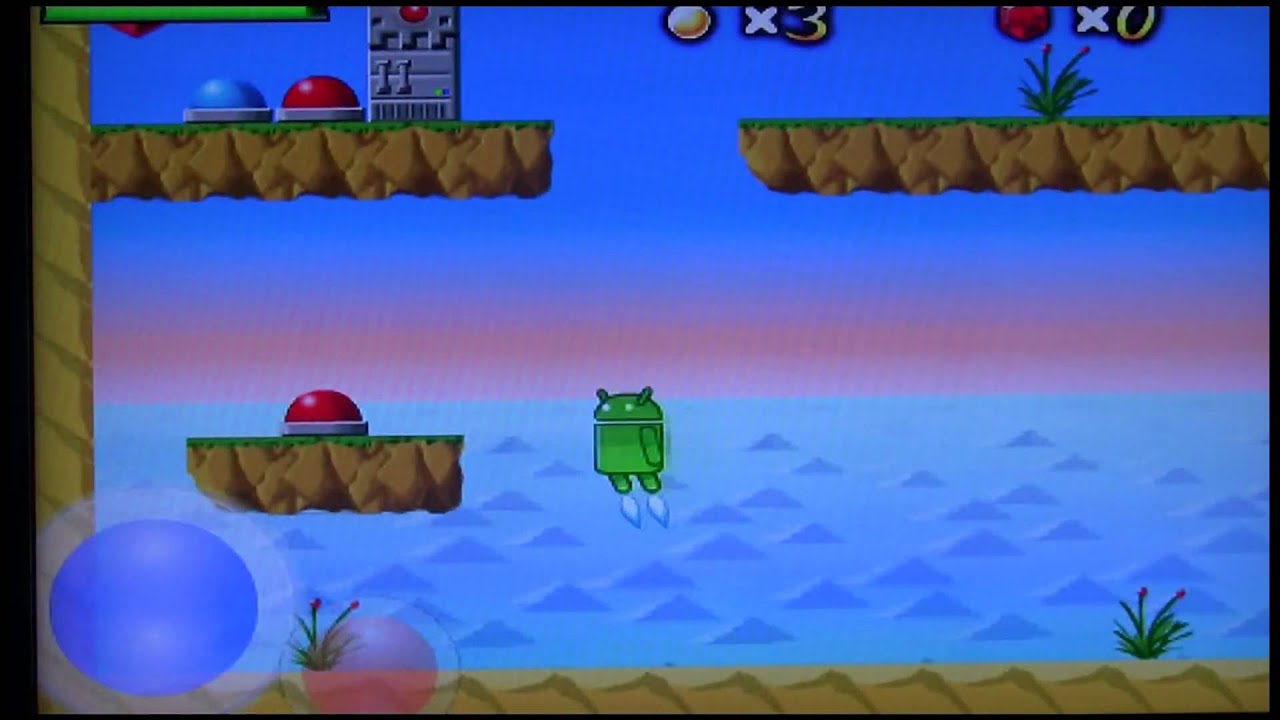
Replica Island
Side-scrolling platform game
Guide the Android robot through 40 action-packed platforming levels on a quest
to discover a secret power source on a mysterious island. With a retro style and
unique, challenging game play, Replica Island is a new take on the classic
platformer genre.
Game source code in this link:
Replica Island
GitHub - masokotanga/ReplicaIsland · GitHub
Replica Island | F-Droid - Free and Open Source Android App Repository
Google I/O 2010 making real-time game
GENERAL INFORMATION Title: Replica Island
Developer: Team Replica - Chris Pruett and Genki Mine
Target Platform: Android devices with Android 1.5 or newer installed. This includes the T-Mobile G1, T-Mobile myTouch, DoCoMo HT-03A, Verizon DROID, Sprint Hero, and almost every other Android device under the sun.
Price: Free! Seriously!
URL: replicaisland.net
Available From: Android Market (when released)
About Replica Island
Replica Island is a free, open-source game for Android devices. It stars the Android robot, who happens to have a pretty devastating butt-stomp attack. With 40 levels, an intriguing story, and high-end 2D graphics, Replica Island is a unique entry to the Android game catalog.
Edit:
Inputs run on delay and sleep to stop flooding of controls.
In source code MainMenuActivity.java is called and on line 364 is SetPreferencesActivity.class.
Game is not meant for gamepads, can we add gamepad support?
Edit2:
In source code (I use mobile phone to browse source code in github with text view) InputKeyboard.java In Android, KeyEvent.getMaxKeyCode() is a static method that returns the maximum key code value defined in the KeyEventclass.
This is useful if you need to iterate over all possible key codes or validate that a given key code is within the valid range.
if (keyCode >= 0 && keyCode <= KeyEvent.getMaxKeyCode()) {
    // Valid key code
}
So it only looks for keyboard keys, gamepad keycodes sit outside of this numbering?
Edit3:
Good news, go to options and disable onscreen controls. Gamepad starts to work correctly, I can map gamepad on keyboard inputs as I want went gamepad dpad left/ right move and up/ down jump slam. I can use analog joystick L1? All works button O works as back cancel and U button works as confirm exit from menus. Had to use wifi usb mouse to navigate main menu to get options and continue, I add this info to thread. Only bad that you have to use trackpad/ wifi/ usb mouse in main menu. By the way I connected wifi usb keyboard to try left right and it did not work, mapped to keyboard asdw and still no left right, then I went to options snd disabled onscreen controls. Seems it is coded so physical keyboard controls or on screen swipes not both at same time. Because of Ouya console we can connect physical keyboards/ gamepads/ controllers and use swipes as trackpad with mouse. Quite cool quirk. Back in day it was one control method or another and nowadays it is both.
Edit4:
I got stuck on level 24, no tilt commands to steer forcefield trough rock wall into robot. Rock wall is 4 rock blocks wide.
Windows Copilot answer
To get the phone tilt in degrees on Android 4, you can use the accelerometer and geomagnetic field sensor to determine the device’s orientation. Here’s a simplified approach:
-
Use the accelerometer to detect when the phone is tilted. If the tilt is detected, you can calculate the angle using the formula:
angle = Math.atan2(X_Axis, Y_Axis)/(Math.PI/180). -
For portrait orientation, the angle should be between 0 and 180 degrees. For landscape orientation, the angle should be between 180 and 360 degrees.
1
1

Stackovetflow thread to read degrees:
Edit6:
Line 226 in AnimationComponent.java is // Charge if attack button pressed. That should charge to ose orb, but I don’t know how tilt movement moves orb.
Edit7:
Line 75-77 in InputSystem.java tilt movement is calculated by Nvidia whitepaper or so it looks like
This is interesting method canonicalOrientationToScreenOrientation
Where is added phone tilt to move force field orb? What is the max tilt to move orb for example right?
Edit8:
Smartphone Android 8.1.0 gives divide by 0 errors, tilt controls are kinda ok, mostly too fast or too slow, with slider it is hard to set.
java.lang.ArithmeticException: divide by zero

at com.replica.replicaisland.GameThread.run(GameThread.java:88)

at java.lang.Thread.run(Thread.java:764)